Mastering Azure Deployment and DevOps with Bicep and PowerShell
Leveraging Bicep and PowerShell for Seamless Azure Deployment and DevOps Excellence

Introduction
In the previous article, we established the importance of cloud-native enterprise apps not just as a competitive advantage but as a strategic imperative. The choice of the cloud platform plays a pivotal role in this transformation, and Azure, Microsoft's cloud solution, is the platform of choice for a multitude of enterprise businesses. This preference is no coincidence, as Azure offers a powerful and dynamic ecosystem perfectly tailored to the needs of modern enterprises. As we delve deeper into Azure-specific deployment strategies, let's explore why this cloud giant stands out as the linchpin of innovation, efficiency, and success for businesses on a global scale. A robust hosting environment is the bedrock upon which your enterprise app's success is built. In the fast-paced digital landscape, an environment that can seamlessly scale with your app's demands and guarantees unwavering reliability is nothing short of essential.
Azure, the cloud platform of choice for many Fortune 500 businesses, excels in this regard. Scalability within Azure is not just a promise; it's a reality. Whether your app experiences a sudden surge in users or data, Azure's dynamic scaling capabilities ensure that it can effortlessly expand to accommodate these changes. This flexibility is a game-changer, allowing your app to meet growing demands without a hitch, thereby guaranteeing a seamless user experience. Reliability is non-negotiable when it comes to hosting your enterprise app. Azure's infrastructure, hosted in data centers worldwide, provides an exceptional level of resilience and uptime. This reliability is the result of Microsoft's unwavering commitment to data security, disaster recovery, and robust network architecture.
In the world of enterprise apps, the importance of a hosting environment that can both scale and deliver unwavering reliability cannot be overstated. Azure's dynamic scalability and exceptional reliability make it the ideal choice for businesses seeking to deploy apps that can weather any storm and flourish in the face of growth and demand. Additionally, we'll introduce the concept of multi-tenancy on Azure, an essential aspect of cloud computing where a single instance of software serves multiple customers, fostering scalability and resource optimization.
How To Deploy
Deploying an application on Azure is a meticulously structured process, encompassing various key components in the development stack: Visual Studio for application development, Azure DevOps for efficient project management, Bicep for streamlined infrastructure provisioning, and PowerShell for precise configuration. However, in this article, our aim is to unravel the complexities of this deployment journey, with a particular emphasis on the often intricate phase of infrastructure deployment and configuration.
There are some steps that are always involved, and these steps have been compiled into a checklist. This checklist is a well-structured process that encompasses planning, source code management, infrastructure provisioning with Bicep and PowerShell, application deployment, CI/CD automation, monitoring, security, and ongoing optimization. By following these steps, we ensure reliable and efficient deployment of your application on the Azure cloud platform.
1. Planning and Design: Before you begin the deployment process, it's crucial to have a clear plan and design for your application. This includes defining the architecture, understanding the application's requirements, and outlining the infrastructure components needed. In our scenario
2. Source Code Management: This means the application code is stored in a version-controlled repository, and you can manage changes and collaborate with your team effectively.
3. Infrastructure as Code (IaC) with Bicep: Bicep is a Domain-Specific Language (DSL) used for defining your Azure infrastructure as code. You'll create Bicep files that describe the Azure resources required for your application, such as virtual machines, databases, storage accounts, and networking components. These Bicep files will serve as the blueprint for your infrastructure. As part of your deployment process, you'll compile and validate your Bicep templates to ensure they are free from syntax errors and conform to Azure best practices.
4. Infrastructure Provisioning: Once your Bicep templates are validated, you can use Azure CLI or PowerShell scripts to provision the defined infrastructure on Azure. This step creates the necessary Azure resources to host your application. It's a critical phase as it establishes the foundation for your app.
5. Configuration Management with PowerShell: After infrastructure provisioning, you'll use PowerShell scripts to configure the infrastructure and prepare it for application deployment. This could involve tasks such as setting up environment variables, configuring security settings, or installing required software components.
6. Application Deployment: With the infrastructure ready, you can now deploy your application. This can be done using various methods depending on your application type. For web applications, you might use Azure App Service or Azure Kubernetes Service. For virtual machines, you can deploy your application directly onto them.
7. Continuous Integration and Continuous Deployment (CI/CD): Set up a CI/CD pipeline with Azure DevOps. This allows the deployment process to be entirely automated, whenever changes are made to the source code. The CI/CD pipeline can build your application, run tests, and deploy it to Azure automatically.
8. Monitoring and Logging: Post-deployment, it's crucial to set up monitoring and logging using Azure Monitor and Azure Log Analytics. This enables tracking the performance of the application, early issue detection, and effective troubleshooting.
9. Security and Compliance: Implement security best practices and ensure that your application complies with relevant regulations. Azure offers a range of security services to help secure your application.
10. Scaling and Optimization: Depending on your application's requirements, you can configure scaling rules in Azure to ensure your app can handle changes in load. You can also optimize costs by right-sizing resources.
11. Backup and Disaster Recovery: Set up backup and disaster recovery strategies to protect your application's data and ensure business continuity in case of unexpected events.
The architecture diagram below shows a multi-tenant view of our solution. Azure provides robust support for building and managing applications that can serve multiple tenants while keeping their data and configurations isolated. This concept is especially valuable for businesses looking to deliver Software as a Service (SaaS) solutions, as it enables the efficient sharing of resources and cost-effectiveness while maintaining data security and tenant isolation.
By incorporating multi-tenancy into your Azure deployment strategy, you can harness the full potential of the platform, ensuring that your applications can efficiently serve numerous clients with varying needs, all within a secure and resource-efficient environment. This aspect will be explored further in an upcoming article, shedding light on how to effectively implement multi-tenancy in your Azure app.
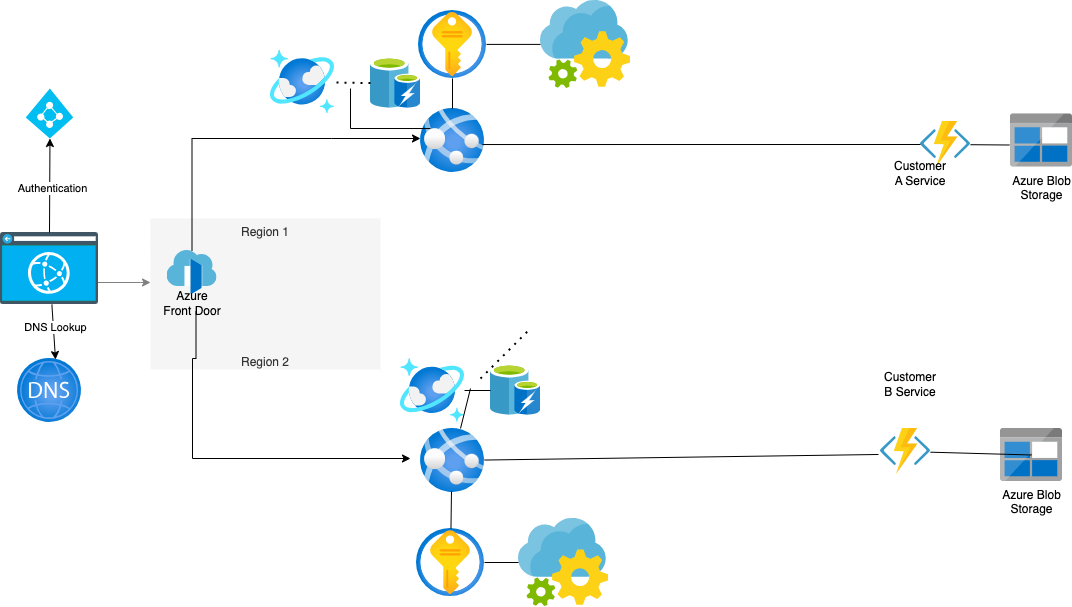
From the diagram we see our fictitious Multi-Tenant Solution application on Azure is powered by a robust and scalable infrastructure comprising the following dependencies
Azure Blob Storage: Centralized storage for customer application assets and specific data.
Azure Functions: Serverless compute resources for executing customer-specific code in response to events from API.
Azure Key Vault: Safely stores and manages application secrets and passwords
App Configuration: Safely stores app configuration settings used with Azure Key Vault.
Azure Redis Cache: Provides high-speed, low-latency caching for frequently accessed data.
Azure Container Registry: Hosts the docker images of the applications we deploy on functions and app services
Azure Cosmos DB: A globally distributed, highly available database for customer and user onboarding data. We could use the Azure SQL server here also, it depends on your application requirements, for the purpose of our scenario we want the NOSQL global availability offered by cosmos.
Azure App Services: Hosting environment for web applications and APIs, ensuring scalability and reliability. This part of the application is stateless and is reused by other customers.
Azure Front Door: Achieves global availability by routing requests to regional sites, optimizing performance, and minimizing latency.
Azure DNS: Hosts and manages the Domain Name System for Azure services
Azure Active Directory / Microsoft Entra ID: Azure identity management service for authentication and authorization purposes
Lastly, we use Azure DevOps as our trusted software project management tool
The architecture has the shared API tier reused by all customers and we keep the AI model and customer data isolated at the boundaries of the system. it is important in certain scenario’s to have strict data isolation. The application is multi tenant but the data tier is isolated for customer data protection. This architecture is robust, scalable, and data-secure as it relies on Azure's infrastructure, allowing for seamless integration and scalability. Azure Blob Storage ensures efficient customer data isolation management, while Key Vault and Azure App Configuration provide secure secrets and configurations. Azure Redis Cache optimizes data access speed, and Cosmos DB offers global data distribution and high availability. Azure Functions and App Services enable scalable compute resources, while Azure Front Door ensures global accessibility. Together, this Azure infrastructure powers an AI application that is reliable, high-performing, and tailored to the unique needs of each customer. The secret sauce to our application scaling is automation, and we will rely on Bicep and PowerShell scripts to achieve this.
Bicep and PowerShell and The Power of Automation and Scripting
In the ever-evolving landscape of cloud computing, automation is the linchpin of efficiency, and scripting languages like Bicep and PowerShell have emerged as invaluable tools for orchestrating complex deployments. Bicep is a domain-specific language (DSL) designed for deploying Azure resources. It simplifies the process of infrastructure deployment by offering a more concise and structured way to define Azure resources and their configurations. Bicep scripts are written in a format that is easier to read and maintain than traditional ARM templates. This DSL provides a declarative approach to defining infrastructure, reducing the complexity of Azure resource deployment. Bicep leverages the power of Azure Resource Manager (ARM) to ensure accurate and efficient resource provisioning, making it a valuable tool for streamlining and automating deployment workflows. We would define the infrastructure that we deploy to various locations in our Bicep file. The main thing to emphasize at this point is we need to capture some outputs from the deployment, and with Bicep, it is as easy as specifying `output ovar string = 'Hello World'`. Microsoft provides excellent documentation and tutorials to help developers get up to speed with the Bicep language for deploying.
Azure PowerShell is a formidable Bicep ally when it comes to deploying resources across different Azure regions. Azure PowerShell is a command-line interface (CLI) designed explicitly for managing Azure resources. Its flexibility and versatility make it a preferred choice for cloud administrators and developers alike. With Azure PowerShell, you can interact with Azure services programmatically, enabling seamless resource management and automation. Managing infrastructure across multiple Azure regions can be a daunting task, especially when considering the diverse array of resources involved. Azure PowerShell simplifies this complexity by providing a unified platform for deploying, configuring, and managing resources to different locations using a script. The use of scripts in Azure PowerShell deployments offers several compelling advantages:
1. Consistency: Scripts ensure that resource provisioning and configuration remain consistent across different Azure regions. This consistency eliminates the risk of configuration drift and ensures that each deployment adheres to predefined standards.
2. Repeatability: With scripts, deployments become easily repeatable processes. This repeatability is invaluable for scaling resources up or down, migrating applications, and maintaining a predictable environment.
3. Efficiency: Automated deployments are significantly faster and more efficient than manual configurations. Azure PowerShell scripts can be parameterized, enabling you to tailor deployments to specific requirements and environments.
4. Error Reduction: By eliminating manual configuration steps, scripts reduce the potential for human errors. This leads to improved reliability and fewer operational issues.
Putting it all together
it is important to explore practical examples and best practices for leveraging Azure PowerShell in multi-location deployments. Our solution is deployed in multiple regions for redundancy, this way we are always available with some data consistency issues. We'll discover how to script the deployment of resources across different Azure regions efficiently, paving the way for scalable, consistent, and secure solutions.
When it comes to our PowerShell scripts, we always strive to maintain clarity and readability. By structuring our code into functions and modules, we create scripts that are easy for us to understand and maintain over time. Parameterization is a key aspect of our approach, allowing us to customize and fine-tune our scripts to suit various scenarios. Well-defined parameters enhance the reusability and adaptability of our scripts, ensuring they can flexibly address a wide range of tasks. When unexpected issues arise during script execution, we rely on PowerShell's robust error-handling mechanisms, such as Try-Catch blocks, to gracefully manage these challenges. In essence, our emphasis on organization, parameterization, and error handling empowers us to compose scripts that are not only efficient but also resilient and adaptable. This approach enables us to confidently orchestrate complex automation tasks with precision and reliability.
```powershell
param (
[string]$resourceGroupName,
[string]$location,
[string]$templateFile,
[string]$parametersFile
)
# Create the resource group
az group create --name $resourceGroupName --location $location
# Deploy your infrastructure
$jsonResult = az deployment group create --name "${resourceGroupName}Deployment" --resource-group $resourceGroupName --template-file $templateFile --parameters $parametersFile | ConvertFrom-Json
# Retrieve the database connection string
$ovar = $jsonResult.properties.outputs.ovar.value
# Output the database connection string with a location-specific variable name
Write-Host "##vso[task.setvariable variable=ovar_${location};isOutput=true]$ovar"
```
This PowerShell script deploys will deploy the Bicep template with the infrastructure we have from the previous section specified and outputs the variable `ovar` from it.
Retrieving Output
Retrieving outputs in a deployment pipeline is a critical aspect, especially in scenarios where a multi-region deployment is involved. This can be particularly relevant when you need parameters or outputs from one stage, such as the "Database Connection String," for use in subsequent stages, like performing database migrations. In our case, dynamically generating variables using the "Each" keyword can help ensure a seamless transfer of values between stages. This capability is invaluable in a multi-region deployment where you might need specific region parameters for subsequent actions, ensuring a smooth and coordinated deployment process across different regions.
To create variables dynamically use the "Each" keyword and seamlessly transfer values between stages, follow this approach:
```yaml
- stage: StageB
jobs:
- job:
variables:
- ${{ each Location in parameters.Locations }}:
- name: ovar_${{ Location }}
value: $[stageDependencies.StageA.CreateVars.outputs['deploy_${{ Location}}.ovar_${{ Location }}'] ]
pool:
vmimage: ubuntu-latest
steps:
- ${{ each Location in parameters.Locations }}:
- script: echo hello from $(ovar_${{ Location }})
```
Note that the value of the variables is defined with the `stageDependencies`. The syntax is: `$[ stageDependencies.<name of the stage>.<name of the job>.outputs['<name of the step>.<name of the variable>'] ]`. Once created the variables, you can now use the newly created variable in the stage that will contain the value from the previous stage.
Deploying resources to multiple Azure locations through PowerShell offers several benefits. Firstly, it enhances the reliability of our infrastructure. By having resources spread across geographically diverse regions, we reduce the risk of downtime due to regional outages or failures. Secondly, this approach reduces management overhead as it simplifies resource distribution and scaling. Finally, it greatly enhances disaster recovery capabilities. In the event of a failure or disaster in one region, resources in other regions can seamlessly take over, minimizing service disruption and data loss. This improves the application's performance by reducing latency for end-users but also ensures continued service availability even if one region encounters issues.
Consistency and Disaster Recovery:
Deploying resources across multiple Azure regions, also known as geo-replication, offers several significant benefits, primarily enhancing failover capabilities and resilience for your applications and services. One of the primary benefits is improved high availability, ensuring minimal downtime during regional outages. This approach serves as an effective disaster recovery strategy, safeguarding your data and applications from catastrophic events. It also increases the overall resilience of your applications, reducing the risk of a single point of failure. Deploying resources closer to users in different regions reduces latency and enhances the user experience. Efficient load balancing becomes possible, even during traffic spikes. Geo-replication also helps organizations adhere to regulatory compliance and data residency requirements while maintaining business continuity. It supports testing and development processes, enabling in-depth performance assessments. Multi-region deployments expand your global reach and allow you to optimize resource allocation based on regional demand, enhancing cost-efficiency and scalability. In summary, this strategic approach offers numerous advantages for modern, always-available applications by providing high availability, disaster recovery, resilience, reduced latency, regulatory compliance, business continuity, testing, global reach, performance optimization, and scalability.
Conclusion
DevOps enables the scalability and performance goals necessary for your enterprise solution to thrive in Azure's demanding environment.Furthermore, deploying your app to Microsoft Azure guarantees the scalability and performance necessary for your enterprise solution to thrive in a demanding environment. As you embark on this journey of integration and deployment, remember that Teams is more than just a communication tool; it's a platform for innovation and transformation. By following the steps outlined in this guide, you'll be well on your way to harnessing the full potential of Microsoft Teams and Azure for your brand's success. For prospective customers interested in unleashing the true potential of enterprise app deployment in the Azure environment, feel free to contact me at osasigbinedion@gmail.com to explore how to help you achieve your business goals.